
The Real Bottleneck in Financial Analytics
We are currently 60 days into a complex enterprise data modernization project, successfully streaming core transactional data into a modern cloud warehouse. But as any seasoned finance professional knows, the data pipeline is just the plumbing. The true bottleneck in modernizing financial analytics is the business logic—specifically, taming the General Ledger.
Most modern data migrations fail because standard data engineers don’t understand the mechanical complexity of accounting. They build tables, but they don’t know how to handle the shifting idiosyncrasies of period balances.
Solving Accounting Complexity at the Database Level
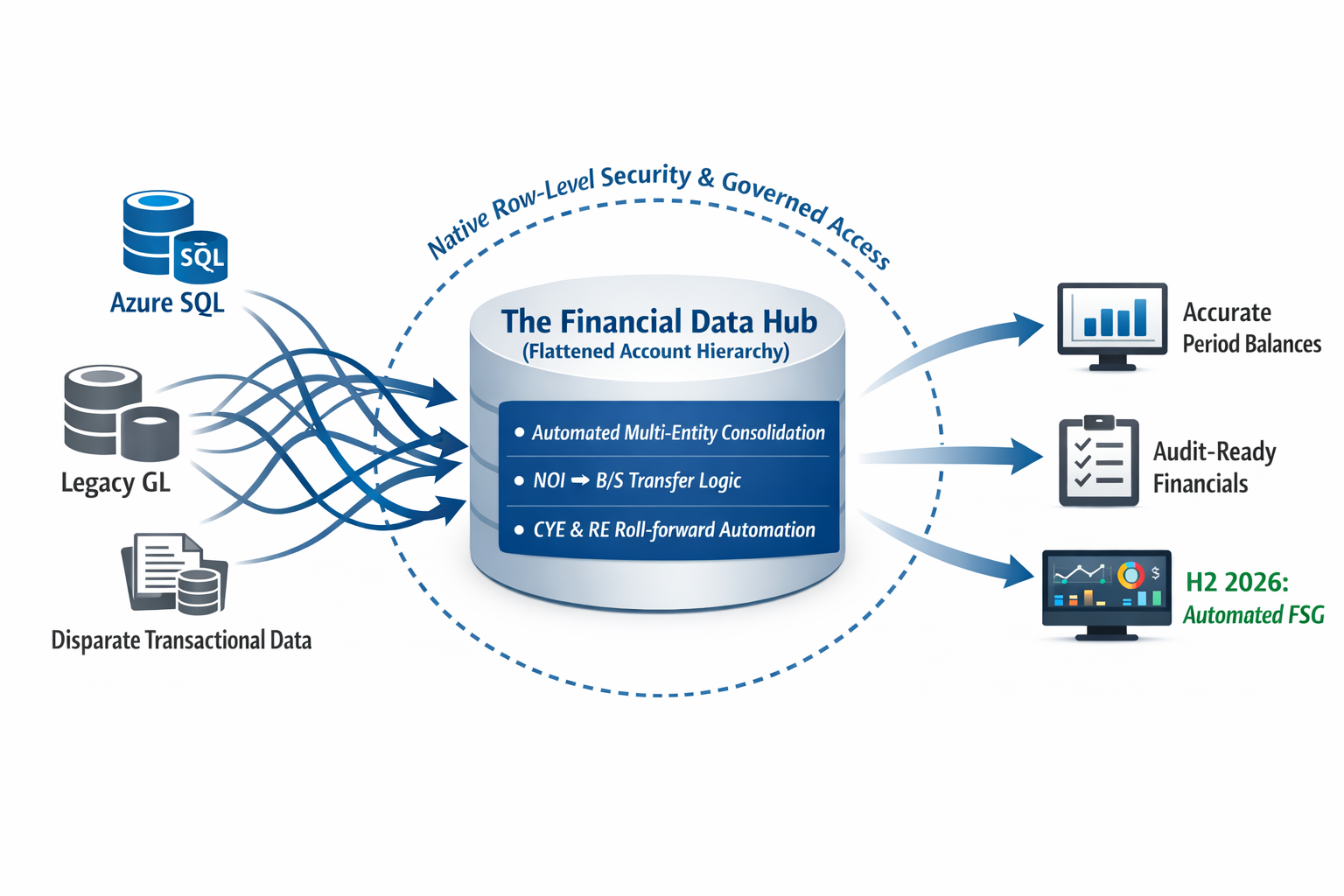
At Datagize, we approach this differently. Drawing on 40+ years of enterprise data engineering and a deep MBA/Accounting foundation, our current milestone involves building out a Financial Data Hub that programmatically solves the most painful aspects of the month-end close.
We do this by flattening the complex account hierarchy directly within the data model. This architectural decision abstracts the heavy logic away from the BI layer and automates the workflows that usually trap finance teams in Excel, including:
- Seamlessly handling the consolidation of books across multiple entities.
- Dynamically calculating roll-forwards for Current Year Earnings (CYE) and Retained Earnings (RE).
- Automating the shift of Net Operating Income (NOI) from the P&L to the Balance Sheet.
Governance: Built-In, Not Bolted On
In financial services, accuracy is only half the battle; security is the other. Our architecture handles strict authentication and native row-level security. Data is restricted strictly on a “need-to-know” basis, ensuring segment leaders only see their approved domains, while secure external data sharing capabilities allow for frictionless, governed output for auditors or board reporting.
The Roadmap: Looking Ahead to Financial Statement Generation (FSG)
With the core Data Hub and consolidation logic deployed, our next major horizon is fully integrated Financial Statement Generation (FSG) natively within the architecture, slated for our 2026/2027 roadmap.
Ready to Transform Your Financial Analytics?
You don’t just need data engineers to move your financial data; you need architects who understand what a balance sheet actually is. If your organization is ready to stop fighting its account hierarchy and modernize its month-end close without compromising financial integrity, let’s talk.
Category: Modernization & Architecture
Strategies for moving off legacy stacks (Mainframe, On-Prem) to Near-Real-Time Data Hubs. Focusing on the engineering patterns that drive speed, scalability, and security.
Achieving Near-Real-Time Data Warehousing on Azure with Datagize

Introduction
Today’s businesses demand instant insights from data. Traditional batch-driven data warehouses often create reporting lags of hours—or even days—making it challenging to make data-driven decisions in real time. At Datagize, we’ve built a near-real-time data warehousing architecture on Azure that delivers 3–5 second latencies from source databases to fact tables. In this blog, we’ll walk you through the key components of our solution and show how we tackled performance, reliability, and costs—without sacrificing maintainability or security.
Who Should Read This Post?
- Chief Data Officers (CDOs), CIOs, and Directors of BI/DW: Looking to modernize data platforms or enable real-time analytics.
- Data Architects and Enterprise Architects: Evaluating Azure services for high-speed data ingestion, transformation, and reporting.
- BI/Data Warehouse Managers: Wanting to understand how near-real-time can be implemented at scale.
Key Takeaways
- Rapid Delivery: Datagize’s prebuilt Python components make near-real-time data pipelines easier and faster to implement.
- Scalable Azure Stack: Leveraging Azure SQL Database, Azure Functions, Event Hubs, and Stream Analytics for both low latency and resiliency.
- Cost-Effective & Flexible: Pay-as-you-go consumption model plus strategic tuning to keep overhead manageable.
Architecture Overview
Below is a generic architecture diagram depicting the end-to-end data flow:

- Azure SQL Database (with CDC) – The source system uses Change Data Capture (CDC) on tables that need real-time syncing.
- Azure Logic Apps – This lightweight workflow orchestrates the frequency (e.g., every 2 seconds) of calls to our first Python-based Azure Function.
- Azure Functions (CDC Reader) – A bespoke Python script pulls new or updated rows from the source database (using CDC or a sequence ID), then writes these events to Azure Event Hubs.
- Azure Event Hubs – Receives and temporarily buffers incoming data events.
- Azure Stream Analytics – Consumes events in near real-time and calls our second Azure Function.
- Azure Functions (Procedure Caller) – Another Python script that processes the events and calls a stored procedure in the target data warehouse.
- Azure SQL Data Warehouse – The final destination for fact and dimension tables, updated on a streaming basis, with specialized logic to handle asynchronous arrivals and early-arriving facts.
- Power BI – Consumes the latest data from the warehouse for dashboards, reports, and analytics.
High-Level Data Flow:
- Detect Changes: Azure SQL DB logs table changes via CDC.
- Pull Changes: An Azure Logic App triggers every 2 seconds, invoking the CDC Reader Function.
- Queue Events: The Function sends new/updated rows to Azure Event Hubs.
- Stream & Process: Azure Stream Analytics picks up the event stream and calls the second Python Function.
- Load Warehouse: The second Function executes a stored procedure in the Azure SQL Data Warehouse, updating facts and dimensions in near-real time.
- Analytics: Power BI taps into the warehouse for dashboards and reports.
Key Implementation Details
Change Data Capture Setup
We set up CDC at the table level in Azure SQL Database. This allows us to track inserts, updates, and deletes without intrusive changes to application logic. Alternatively, if a reliable timestamp or sequence column exists, that can be used as a fallback or simpler approach.
Bespoke Python Functions
- CDC Reader Function
- Pulls incremental changes from source tables (using CDC or a custom sequence/timestamp).
- Packages these changes into event payloads and pushes them to Azure Event Hubs.
- Intelligent error handling, batching, and incremental read logic are part of Datagize’s “secret sauce.”
- Procedure Caller Function
- Subscribes to streaming events from Azure Stream Analytics.
- Batches or processes row-by-row transactions as needed.
- Invokes a stored procedure in the Azure SQL Data Warehouse for the final load. The stored procedure manages fact/dimension updates, handles upserts, and addresses early-arriving facts.
Performance Tuning (High-Level)
Although the specifics of our tuning remain proprietary, we rely on standard best practices like creating the right indexes, partitioning large tables, and carefully managing concurrency. These tactics help maintain 3–5 second latencies while handling real-world data volumes.
Latency Achievements and Monitoring
We measured our 3–5 second end-to-end performance by inserting or updating small test batches (around 44 rows) in the source. Each major step (CDC detection, event publication, streaming, and data warehouse insertion) was timestamped. By comparing logs, we confirmed that data typically arrived in the warehouse in under 5 seconds—even under varying loads.
Monitoring
- We used Azure Monitor and Application Insights to track function invocations, event processing times, and throughput.
- Built-in Azure dashboards helped visualize average latency across the pipeline, alerting on potential bottlenecks.
Scalability and Resilience
Handling Spikes
Our architecture accounts for high-volume or bursty data through batching and concurrency. Azure Event Hubs and Stream Analytics can scale to handle large spikes, while the stored procedure approach in the data warehouse uses staging tables to handle large inserts efficiently.
Retries and Failures
Both Functions and Logic Apps can be configured with retry policies to handle transient errors. If an Azure Function or Event Hub experiences an outage, Azure’s built-in platform resilience ensures events aren’t lost and Functions can retry when systems recover.
Cost Management
Optimizing Azure Functions
Since Functions run on a consumption plan, cost is tied to execution time and frequency. By carefully setting polling intervals (in this case, every 2 seconds for near-real-time needs), we minimize unnecessary triggers. Also, optimizing the Python scripts reduces runtime and thus overall cost.
Other Services
- Event Hubs & Stream Analytics: Typically adds about 5–20% overhead on top of core SQL costs. With efficient scaling and batch processing, these services remain relatively cost-effective.
- Logic Apps: Minimal overhead given our lightweight approach (calls every 2 seconds).
- Azure SQL Costs: The main expense usually comes from source and target Azure SQL DB environments. Our real-time pipeline approach adds only a manageable layer of overhead on top.
Security and Governance
Our Azure SQL environments use encryption at rest by default. We can also encrypt data in transit for end-to-end protection. Standard Azure security features—like network restrictions and IP whitelisting—can be applied to Functions, Event Hubs, and Stream Analytics. While not the focus of this article, robust data governance and role-based access control are critical for any production environment, especially when multiple teams need different levels of access.
Future Roadmap
We plan to explore the following enhancements:
- Delta Lakehouse with Databricks
- Implementing a Delta Lake architecture can provide an advanced layer for structured and unstructured data.
- With Databricks, we can unify batch and streaming data, enabling more complex transformations and near-real-time analytics on a broader data set.
- Further Cost Optimization
- Exploring reserved capacity or other tiers for Event Hubs and Stream Analytics.
- Tweaking polling intervals and function runtime to balance real-time needs with cost efficiency.
- Enhanced Security
- Adding encryption in transit (TLS) for every service endpoint.
- Exploring advanced firewall/network rules for each service.
- Edge Cases & Complex Scenarios
- Continuous improvements to handle advanced use cases like multi-table transactions, referential integrity checks, and advanced data transformations.
Lessons Learned
- Preview Features: The built-in CDC (Preview) feature in Azure Data Factory (ADF) has cost inefficiencies and throttling limitations.
- Polling Intervals: Balancing near-real-time needs with cost overhead can be tricky—finding the right frequency is key.
- Proprietary Tuning: Our Python-based approach gave us more control and better performance than off-the-shelf solutions.
Conclusion
By combining Azure SQL CDC, Azure Functions, Event Hubs, and Stream Analytics with Datagize’s bespoke Python components, we’ve delivered a solution that enables near-real-time data warehousing with latencies as low as 3–5 seconds. This architecture proves that speed, flexibility, and cost-effectiveness can coexist with the right design choices.
Ready to transform your data platform? Contact Datagize to learn how we can accelerate your journey to near-real-time data analytics on Azure—and explore the possibilities of Delta Lakehouse and Microsoft Fabric in your environment.
About Datagize
Datagize specializes in building scalable, high-performance data solutions that drive actionable insights. Our team of experts has deep experience with cloud-native architectures, BI, analytics, and machine learning—empowering businesses to stay ahead in a data-driven world.