
Building a Multi-Entity Financial Data Hub Inside a Regulated Bank

A Tier-1 financial institution needed general ledger data from multiple legal entities consolidated into a single, governed analytics platform — without loosening a single control.

At a glance

ClientTier-1 financial institution
IndustryBanking and financial services
PlatformSnowflake, with Azure SQL source systems
EngagementMulti-phase
StatusPhase 1 deployed to production; Phase 2 in design

The challenge

Finance teams at multi-entity organizations spend the first week of every month answering the same question: do these numbers agree?

Our client’s general ledger data lived in operational systems built for transaction processing, not analysis. Consolidating across legal entities meant manual reconciliation, spreadsheet-based assembly, and a month-end close where the analysis could not start until the data wrangling finished.

They did not need a faster report. They needed a governed layer between the ledger and the analyst — one the finance organization could trust without re-deriving every figure by hand.

The constraint that shaped everything

This is the part most data modernization stories leave out.

The work happened inside a regulated bank. That meant a formal vendor security review before a single production credential was issued. It meant every change moving through a documented change-request process with test evidence and independent approval. It meant no customer records and no personally identifiable information were ever available to us during the build.

Most consultancies treat that period as dead time and bill for waiting. We didn’t.

While the security review ran, we built and validated the entire migration approach in an isolated lab environment using only technical metadata and synthetic data. When final clearance came through, we weren’t starting. We were deploying something already proven.

That decision is the single reason this project delivered on the timeline it did — roughly a 50% reduction in development cycle time.

What we built

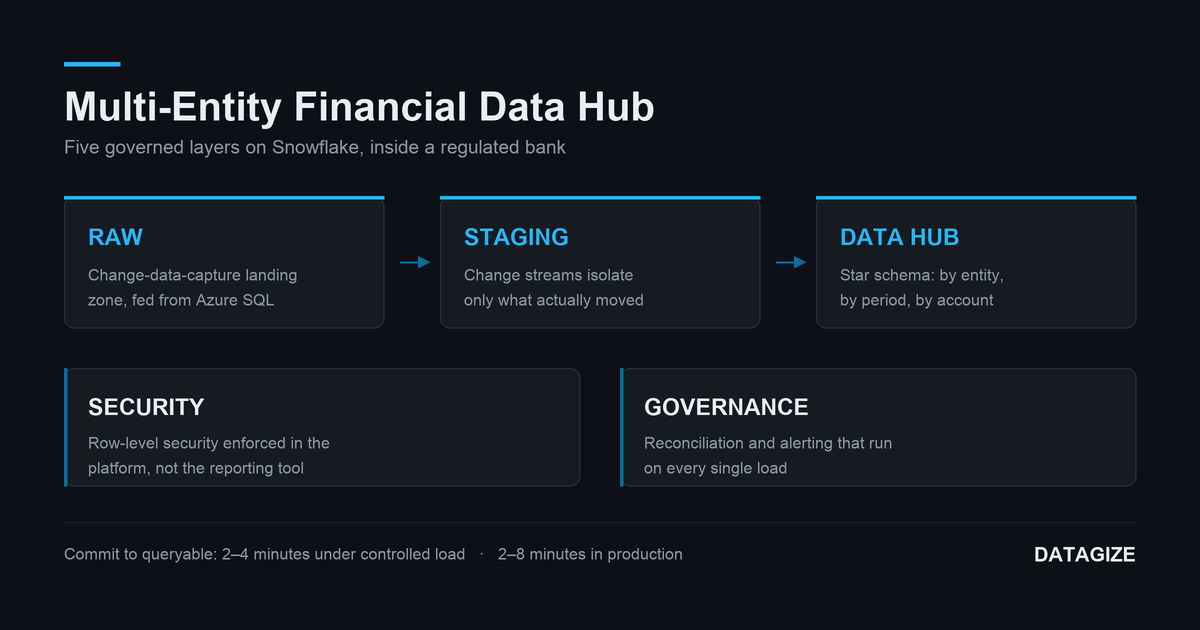
A layered Snowflake data hub — five distinct schemas, each with one job, each a real deployment and permissions boundary:

  • Raw — change-data-capture landing zone, fed continuously from the client’s Azure SQL source systems via enterprise replication tooling.
  • Staging — change streams that isolate what actually moved since the last run, so downstream processing handles deltas rather than reprocessing history. The pipeline runs as micro-batches: a ledger change posted in the source systems reaches the hub in two to four minutes under controlled load testing, and two to eight minutes in production.
  • Data hub — the consumption layer. A dimensional star schema modeled around how finance actually asks questions: by entity, by period, by account.
  • Security — row-level security enforced in the platform itself, not bolted onto a reporting tool. Entity-level data separation is a property of the data, not a setting someone can forget.
  • Governance — automated validation and alerting. Independent checks reconcile the hub against source counts and balances on every load and raise an alert when they disagree.

That last layer is the one we’d argue matters most. Reconciliation isn’t a project phase that ends. It’s a standing control that runs on every load, forever.

The platform runs to more than 250 managed database objects. Finance users reach it through governed reporting; the operations team monitors load health through a dashboard running natively inside Snowflake.

The part that isn’t the pipeline

The data pipeline is the plumbing. The hard problem was accounting.

Getting general ledger data into a warehouse is a solved problem. Modeling it so that entity consolidation, period logic, and account hierarchies behave the way a controller expects — that requires someone who understands the ledger, not just the loader.

Every design decision in the star schema traces back to a mechanic of how the business actually closes its books. That domain fluency is what separated this engagement from a generic lift-and-shift, and it’s what we’d tell any finance organization to screen for before hiring a data partner.

How we worked

We put the schema under version control. The platform arrived as a sequence of hand-maintained deployment scripts, versioned by filename, with no history between versions. We migrated the entire schema into a proper repository — one file per database object, generated deployment scripts, and automated drift detection that compares what’s actually running against what’s supposed to be. Nobody has to remember what changed. The system can prove it.

We built for the bank’s process, not around it. Change requests ship with generated implementation plans and test-evidence workbooks. Approval gates are part of the delivery pipeline, not friction applied to it.

We used Gen AI where it was safe and useful. Accelerating schema migration and validation work in an isolated environment — never on customer data, never as a substitute for review. We wrote about that approach in The Long Game.

Results

  • Phase 1 in production, serving governed general ledger analytics across multiple legal entities.
  • Automated reconciliation running on every load, replacing manual spot-checks with standing controls.
  • Full deployment traceability — every object versioned, every change attributable, drift detectable automatically.
  • A finance team that starts the month analyzing instead of assembling.

What’s next

Phase 2 is underway: additional operational reporting, and a design engagement to map financial reporting onto the hub.

Is your month-end close a data problem?

If your finance organization is reconciling entities by hand, or your analysts spend the first week of the month assembling data instead of interpreting it, that’s an architecture problem — and it’s fixable.

Architecting a Financial Data Hub for Multi-Entity Consolidation

Update, August 2026: Phase 1 is now in production. Read the full case study.

The Real Bottleneck in Financial Analytics

We are currently 60 days into a complex enterprise data modernization project, successfully streaming core transactional data into a modern cloud warehouse. But as any seasoned finance professional knows, the data pipeline is just the plumbing. The true bottleneck in modernizing financial analytics is the business logic—specifically, taming the General Ledger.

Most modern data migrations fail because standard data engineers don’t understand the mechanical complexity of accounting. They build tables, but they don’t know how to handle the shifting idiosyncrasies of period balances.

Solving Accounting Complexity at the Database Level

At Datagize, we approach this differently. Drawing on 40+ years of enterprise data engineering and a deep MBA/Accounting foundation, our current milestone involves building out a Financial Data Hub that programmatically solves the most painful aspects of the month-end close.

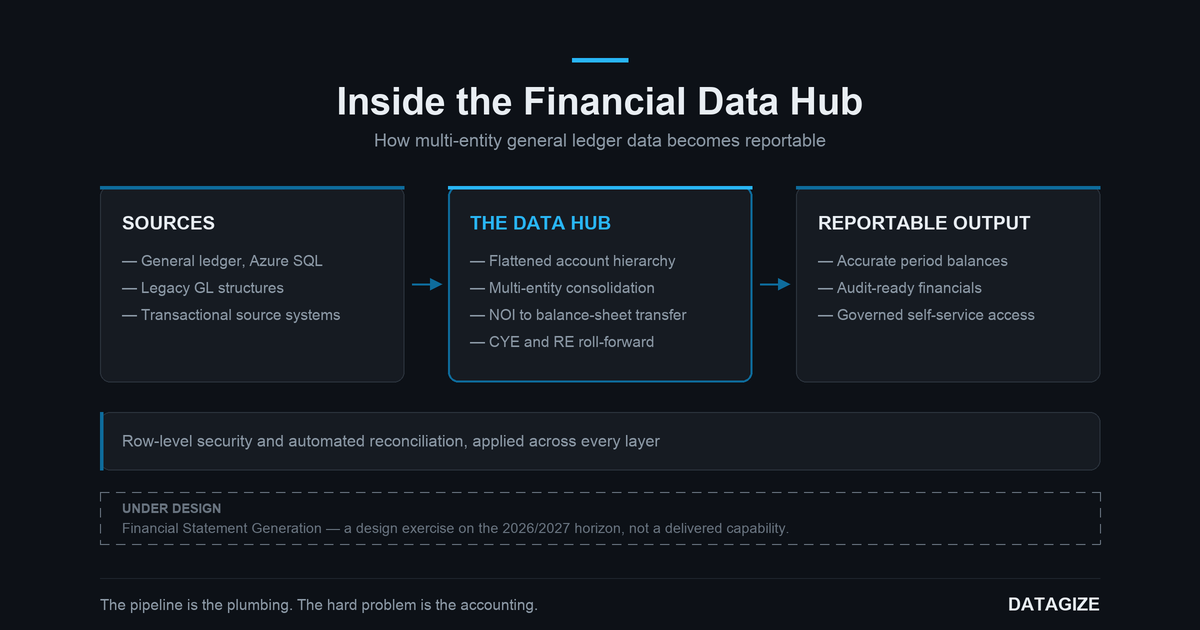
We do this by flattening the complex account hierarchy directly within the data model. This architectural decision abstracts the heavy logic away from the BI layer and automates the workflows that usually trap finance teams in Excel, including:

  • Seamlessly handling the consolidation of books across multiple entities.
  • Dynamically calculating roll-forwards for Current Year Earnings (CYE) and Retained Earnings (RE).
  • Automating the shift of Net Operating Income (NOI) from the P&L to the Balance Sheet.

Governance: Built-In, Not Bolted On

In financial services, accuracy is only half the battle; security is the other. Our architecture handles strict authentication and native row-level security. Data is restricted strictly on a “need-to-know” basis, ensuring segment leaders only see their approved domains, while secure external data sharing capabilities allow for frictionless, governed output for auditors or board reporting.

The Roadmap: Looking Ahead to Financial Statement Generation (FSG)

With the core Data Hub and consolidation logic deployed, the next question we are working through is what fully integrated Financial Statement Generation (FSG) would look like natively within this architecture. That is a design exercise on the 2026/2027 horizon, and we will write about what we learn from it.

Ready to Transform Your Financial Analytics?

You don’t just need data engineers to move your financial data; you need architects who understand what a balance sheet actually is. If your organization is ready to stop fighting its account hierarchy and modernize its month-end close without compromising financial integrity, let’s talk.

Achieving Near-Real-Time Data Warehousing on Azure with Datagize

Introduction

Today’s businesses demand instant insights from data. Traditional batch-driven data warehouses often create reporting lags of hours—or even days—making it challenging to make data-driven decisions in real time. At Datagize, we’ve built a near-real-time data warehousing architecture on Azure that delivers 3–5 second latencies from source databases to fact tables. In this blog, we’ll walk you through the key components of our solution and show how we tackled performance, reliability, and costs—without sacrificing maintainability or security.

Who Should Read This Post?

  • Chief Data Officers (CDOs), CIOs, and Directors of BI/DW: Looking to modernize data platforms or enable real-time analytics.
  • Data Architects and Enterprise Architects: Evaluating Azure services for high-speed data ingestion, transformation, and reporting.
  • BI/Data Warehouse Managers: Wanting to understand how near-real-time can be implemented at scale.

Key Takeaways

  • Rapid Delivery: Datagize’s prebuilt Python components make near-real-time data pipelines easier and faster to implement.
  • Scalable Azure Stack: Leveraging Azure SQL Database, Azure Functions, Event Hubs, and Stream Analytics for both low latency and resiliency.
  • Cost-Effective & Flexible: Pay-as-you-go consumption model plus strategic tuning to keep overhead manageable.

Architecture Overview

Below is a generic architecture diagram depicting the end-to-end data flow: 

  1. Azure SQL Database (with CDC) – The source system uses Change Data Capture (CDC) on tables that need real-time syncing.
  2. Azure Logic Apps – This lightweight workflow orchestrates the frequency (e.g., every 2 seconds) of calls to our first Python-based Azure Function.
  3. Azure Functions (CDC Reader) – A bespoke Python script pulls new or updated rows from the source database (using CDC or a sequence ID), then writes these events to Azure Event Hubs.
  4. Azure Event Hubs – Receives and temporarily buffers incoming data events.
  5. Azure Stream Analytics – Consumes events in near real-time and calls our second Azure Function.
  6. Azure Functions (Procedure Caller) – Another Python script that processes the events and calls a stored procedure in the target data warehouse.
  7. Azure SQL Data Warehouse – The final destination for fact and dimension tables, updated on a streaming basis, with specialized logic to handle asynchronous arrivals and early-arriving facts.
  8. Power BI – Consumes the latest data from the warehouse for dashboards, reports, and analytics.

High-Level Data Flow:

  1. Detect Changes: Azure SQL DB logs table changes via CDC.
  2. Pull Changes: An Azure Logic App triggers every 2 seconds, invoking the CDC Reader Function.
  3. Queue Events: The Function sends new/updated rows to Azure Event Hubs.
  4. Stream & Process: Azure Stream Analytics picks up the event stream and calls the second Python Function.
  5. Load Warehouse: The second Function executes a stored procedure in the Azure SQL Data Warehouse, updating facts and dimensions in near-real time.
  6. Analytics: Power BI taps into the warehouse for dashboards and reports.

Key Implementation Details

Change Data Capture Setup

We set up CDC at the table level in Azure SQL Database. This allows us to track inserts, updates, and deletes without intrusive changes to application logic. Alternatively, if a reliable timestamp or sequence column exists, that can be used as a fallback or simpler approach.

Bespoke Python Functions

  • CDC Reader Function
    • Pulls incremental changes from source tables (using CDC or a custom sequence/timestamp).
    • Packages these changes into event payloads and pushes them to Azure Event Hubs.
    • Intelligent error handling, batching, and incremental read logic are part of Datagize’s “secret sauce.”
  • Procedure Caller Function
    • Subscribes to streaming events from Azure Stream Analytics.
    • Batches or processes row-by-row transactions as needed.
    • Invokes a stored procedure in the Azure SQL Data Warehouse for the final load. The stored procedure manages fact/dimension updates, handles upserts, and addresses early-arriving facts.

Performance Tuning (High-Level)

Although the specifics of our tuning remain proprietary, we rely on standard best practices like creating the right indexes, partitioning large tables, and carefully managing concurrency. These tactics help maintain 3–5 second latencies while handling real-world data volumes.


Latency Achievements and Monitoring

We measured our 3–5 second end-to-end performance by inserting or updating small test batches (around 44 rows) in the source. Each major step (CDC detection, event publication, streaming, and data warehouse insertion) was timestamped. By comparing logs, we confirmed that data typically arrived in the warehouse in under 5 seconds—even under varying loads.

Monitoring

  • We used Azure Monitor and Application Insights to track function invocations, event processing times, and throughput.
  • Built-in Azure dashboards helped visualize average latency across the pipeline, alerting on potential bottlenecks.

Scalability and Resilience

Handling Spikes

Our architecture accounts for high-volume or bursty data through batching and concurrency. Azure Event Hubs and Stream Analytics can scale to handle large spikes, while the stored procedure approach in the data warehouse uses staging tables to handle large inserts efficiently.

Retries and Failures

Both Functions and Logic Apps can be configured with retry policies to handle transient errors. If an Azure Function or Event Hub experiences an outage, Azure’s built-in platform resilience ensures events aren’t lost and Functions can retry when systems recover.


Cost Management

Optimizing Azure Functions

Since Functions run on a consumption plan, cost is tied to execution time and frequency. By carefully setting polling intervals (in this case, every 2 seconds for near-real-time needs), we minimize unnecessary triggers. Also, optimizing the Python scripts reduces runtime and thus overall cost.

Other Services

  • Event Hubs & Stream Analytics: Typically adds about 5–20% overhead on top of core SQL costs. With efficient scaling and batch processing, these services remain relatively cost-effective.
  • Logic Apps: Minimal overhead given our lightweight approach (calls every 2 seconds).
  • Azure SQL Costs: The main expense usually comes from source and target Azure SQL DB environments. Our real-time pipeline approach adds only a manageable layer of overhead on top.

Security and Governance

Our Azure SQL environments use encryption at rest by default. We can also encrypt data in transit for end-to-end protection. Standard Azure security features—like network restrictions and IP whitelisting—can be applied to Functions, Event Hubs, and Stream Analytics. While not the focus of this article, robust data governance and role-based access control are critical for any production environment, especially when multiple teams need different levels of access.


Future Roadmap

We plan to explore the following enhancements:

  1. Delta Lakehouse with Databricks
    • Implementing a Delta Lake architecture can provide an advanced layer for structured and unstructured data.
    • With Databricks, we can unify batch and streaming data, enabling more complex transformations and near-real-time analytics on a broader data set.
  2. Further Cost Optimization
    • Exploring reserved capacity or other tiers for Event Hubs and Stream Analytics.
    • Tweaking polling intervals and function runtime to balance real-time needs with cost efficiency.
  3. Enhanced Security
    • Adding encryption in transit (TLS) for every service endpoint.
    • Exploring advanced firewall/network rules for each service.
  4. Edge Cases & Complex Scenarios
    • Continuous improvements to handle advanced use cases like multi-table transactions, referential integrity checks, and advanced data transformations.

Lessons Learned

  • Preview Features: The built-in CDC (Preview) feature in Azure Data Factory (ADF) has cost inefficiencies and throttling limitations.
  • Polling Intervals: Balancing near-real-time needs with cost overhead can be tricky—finding the right frequency is key.
  • Proprietary Tuning: Our Python-based approach gave us more control and better performance than off-the-shelf solutions.

Conclusion

By combining Azure SQL CDC, Azure Functions, Event Hubs, and Stream Analytics with Datagize’s bespoke Python components, we’ve delivered a solution that enables near-real-time data warehousing with latencies as low as 3–5 seconds. This architecture proves that speed, flexibility, and cost-effectiveness can coexist with the right design choices.

Ready to transform your data platform? Contact Datagize to learn how we can accelerate your journey to near-real-time data analytics on Azure—and explore the possibilities of Delta Lakehouse and Microsoft Fabric in your environment.


About Datagize
Datagize specializes in building scalable, high-performance data solutions that drive actionable insights. Our team of experts has deep experience with cloud-native architectures, BI, analytics, and machine learning—empowering businesses to stay ahead in a data-driven world.